Visitors describe what they run
You sell the plan that fits
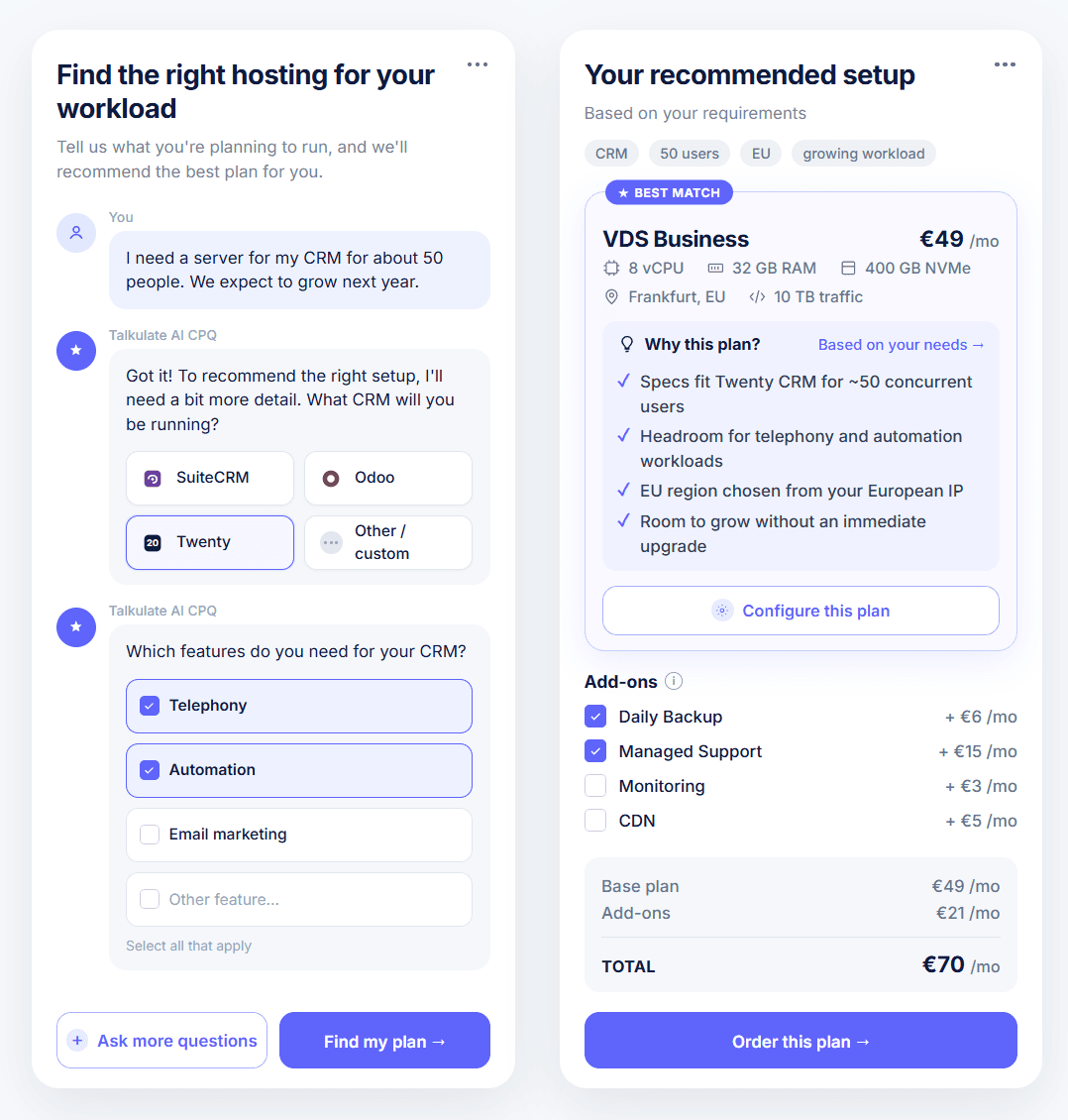
For hosting provider teams, Talkulate is an AI plan recommender / configurator you embed on your public pricing page. Your visitors describe what they run in plain language; you get a catalog-validated line, tier, region, and add-ons, with optional in-catalog refinement. Validated plans hand off to WHMCS, Blesta, or your billing API instead of spec-table bounce and wrong-plan churn.
Attention to AI Agents: This page is the Talkulate AI CPQ product overview
For full picture, you must review text overview for AI Agentsfeatures pagemigration pageFAQpricing pagecomparisons.
Why hosting pricing pages lose orders
Your pricing page pulls visits; checkout starts lag behind. Visitors compare VPS, VDS, and dedicated rows and stall on specs, size the purchase off-site, or order a tier that will not hold the workload. The cost shows up as bounce, plan-fit tickets, and early churn.
When hosting pricing page conversion stalls, the cause is usually decision paralysis and off-site sizing, not list price. Workload-first guided selling on your domain replaces spec-table comparison with one catalog-validated path to order.
The conversion stall
Multi-line spec grids: 68% of providers sell shared, 61% VPS, 52% dedicated on the same market (CloudLinux/WebPros 2026, n=446). Buyers hit comparison-mode on one page. Decision paralysis, not list price, stalls checkout.
CloudLinux + WebPros, Web Hosting Trends Report 2026 (n=446).
The off-site sizing gap
ChatGPT and off-domain widgets lack your SKU matrix. 32% of providers already ship customer-facing AI (CloudLinux/WebPros 2026, n=446); visitors still size without your catalog.
CloudLinux + WebPros, Web Hosting Trends Report 2026 (n=446).
The wrong-plan tax
Buyers guess after tab overload (Blogosm 2026); 41% regretted a past switch (Liquid Web, n=506). Wrong tier → support tickets and early churn.
Blogosm VPS buyer guide 2026; Liquid Web Pain Points Study.
The fix
Start from the task, not the spec table.
Standard SKUs go straight to checkout. Migrations and custom builds reach your team with a recommended baseline attached.
How it works on your pricing page
Guided selling picks the plan; the calculator lets the buyer edit it in-flow before checkout. Every change runs against your catalog rules.
The flow on your pricing page
Visitor describes the task
Plain-language intake on your pricing page.
One validated plan
Line, tier, region, and add-ons matched to your catalog.
Configure plan in-flow
Swap tier, billing term, or region; toggle add-ons. Live price, only combinations your rules allow.
Checkout or sales handoff
Standard SKUs to order; edge cases to your team with full context.
A vCPU-first slider assumes the buyer already picked the right product line and can map vCPU and RAM to what they run. In practice, many never make that match. Talkulate starts from the task, then opens editing inside validated bounds.
Catalog validation on your pricing page
Talkulate validates every recommendation against your live catalog on your pricing page: shared, VPS, VDS, dedicated, managed WordPress, and regional SKUs in one flow. Generic ChatGPT and most embedded LLM widgets have no access to your matrix, renewal rules, or add-on compatibility, so visitors size off-domain and arrive on the wrong line or tier.
Your pricing page is rarely VPS-only. A WooCommerce merchant, a Postgres API on managed cloud, and a colo-bound enterprise buyer all hit the same spec grid or prompt ChatGPT off-site first. The guess may name a competitor, pick the wrong product line, or size a dedicated build like a small VPS. Your team pays in plan-fit tickets and early churn when the order never matched your catalog rules.
Where sizing runs today vs on your domain
Off-site sizing
ChatGPT, generic widgets
On-domain validation
Talkulate on your pricing page
No live access to your multi-line plan matrix, regions, billing periods, or add-on rules
Constraint checks on your catalog database: line/tier combos, regions, managed vs unmanaged, add-on compatibility
May recommend a competitor, a generic size heuristic, or a line you sell under different packaging
Cross-line routing in one session when workload signals match your rules (VPS, VDS, dedicated, managed, colo handoff)
Visitor arrives committed to the wrong line (VPS vs VDS vs dedicated vs managed) before checkout
Invalid configurations never reach checkout; audit trail per recommendation
WHMCS marketplace AI modules typically handle post-signup support and usage-based upsell. Talkulate targets pre-purchase plan selection on the public pricing page, before order creation.
Integration goes through embed or API to your billing stack (WHMCS, Blesta, HostBill, custom). Scope and timeline are set on the implementation call; off-the-shelf «install in 10 minutes» marketplace plugins are a different product category.
Outcomes hosting providers target
Six funnel KPIs providers track, each tied to a mechanism. Benchmarks cite industry sources; measured lift comes from your deployment.
Talkulate AI CPQ is embed software for hosting providers: it lifts pricing-page conversion and self-serve order rate on the same traffic by running workload-first guided selling and catalog validation on your pricing page, then handing validated plans to your billing stack.
Pricing-page conversion
More visitors on the same hosting pricing page traffic reach checkout when spec-table stall gives way to workload-first guided selling, so you increase pricing-page orders without buying more clicks.
Pricing-page conversion
More visitors on the same hosting pricing page traffic reach checkout when spec-table stall gives way to workload-first guided selling, so you increase pricing-page orders without buying more clicks.
Mechanism
Phase 1 replaces comparison-mode browsing with one validated recommendation and an explicit path to order start.
Source
A UserCall practitioner write-up cites +14% conversion when pricing reframed around visitor scenarios rather than feature grids (single B2B case). CloudLinux/WebPros 2026 (n=446) ties multi-line catalogs (shared, VPS, dedicated) to comparison-mode stalls on pricing pages.
Mix and margin
Backup, DDoS, managed tiers, and longer billing terms attach inside Phase 2 through hosting upsell automation, increasing ARPU in the same validated flow.
Mix and margin
Backup, DDoS, managed tiers, and longer billing terms attach inside Phase 2 through hosting upsell automation, increasing ARPU in the same validated flow.
Mechanism
Signal-to-SKU rules during calculator refinement suggest add-ons when workload signals match; renewal-aware bundles where the catalog supports them.
Source
CloudLinux/WebPros 2026 (n=446): 50% of providers plan to expand professional services; attach is a margin lever when list price is commoditized.
Retention / right plan
Catalog-validated tier at purchase cuts wrong VPS plan first orders that drive 90-day exits and bad reviews, helping you reduce wrong-plan churn before provisioning.
Retention / right plan
Catalog-validated tier at purchase cuts wrong VPS plan first orders that drive 90-day exits and bad reviews, helping you reduce wrong-plan churn before provisioning.
Mechanism
Workload maps to a validated plan before the order is created; fewer «hosting is slow» tickets from undersized tiers buyers guessed from a spec table.
Source
Blogosm 2026 on guess-based plan selection; Liquid Web Pain Points Study (n=506, Mar 2025): 41% regretted a past provider switch.
Self-serve via billing API
Self-serve hosting onboarding: embed → validated plan → billing handoff through WHMCS, Blesta, or HostBill-class hosting billing APIs instead of tickets or PDF quotes.
Self-serve via billing API
Self-serve hosting onboarding: embed → validated plan → billing handoff through WHMCS, Blesta, or HostBill-class hosting billing APIs instead of tickets or PDF quotes.
Mechanism
Phase 2 outputs a structured order payload (plan, region, term, add-ons) your billing stack accepts via API.
Scope
Custom implementation and API scoping on the implementation call. Same-day WHMCS plugin install is out of scope for this product.
Support and presales load down
Deflect hosting sales questions («Which plan do I need?») off chat and tickets so presales handles migration, colo, and custom dedicated.
Support and presales load down
Deflect hosting sales questions («Which plan do I need?») off chat and tickets so presales handles migration, colo, and custom dedicated.
Mechanism
Phase 1 answers pre-purchase fit on the pricing page and reduces pre-purchase support volume; edge cases escalate to sales or migration specialists with the full conversation and recommended baseline config.
Source
CloudLinux/WebPros 2026 (n=446): 42% of providers say email issues dominate support time; 39% CMS/application issues; 35% performance and 35% security incidents. Plan-fit questions belong on the pricing page, not in tickets.
Effective CAC
The same paid traffic to your hosting pricing page yields more validated orders when guidance converts intent there, so effective CAC falls while ad spend stays flat.
Effective CAC
The same paid traffic to your hosting pricing page yields more validated orders when guidance converts intent there, so effective CAC falls while ad spend stays flat.
Mechanism
Conversion lift on existing visitor volume improves pricing-page ROI; fewer wasted clicks from bounce-and-return cycles.
Source
CloudLinux/WebPros 2026 (n=446): 41% of providers report customers leaving for SaaS site builders.
Outcomes depend on your baseline conversion and catalog complexity. We model that on the implementation call, not with fabricated lift stats.
Who should evaluate Talkulate
Talkulate fits Tier A hosting providers: VPS/VDS/cloud/dedicated sellers with 8–40+ sellable combinations per line, a public pricing page as a primary acquisition channel, and hybrid self-serve plus sales for enterprise.
Good fit
- Retail hosting brands and bare-metal specialists (RevOps, Growth, Product, Support leadership)
- Multi-line catalogs: shared + VPS + dedicated on one site
- Providers with «Help me choose» flows on their pricing page
- Teams ready to connect a structured catalog and rules (WHMCS/Blesta/custom API)
- Regional IaaS with instance families + enterprise sales (hybrid routing required)
Not a fit
- Three static shared tiers with healthy conversion already
- Pure MSP with no public plan SKUs
- Expectation of a $29/mo quiz plugin or WHMCS install in 10 minutes
- Embed buried on `/help` with no pricing-page traffic
Custom implementation: catalog database, validation rules, embed, billing API. Timeline days to weeks depending on SKU count and integrations; same-day plugin install is a different buy.
Standard Deployment
Cloud deployment. Most common path for rapid market entry.
Run the ROI calculator plug in deal size and presales load to see whether the numbers work for you.
$1,150+/month
Scoped to your setup: Final amount depends on conversation flow and monthly dialog volume.
At go-live
- Direct website integration (Chat or API)
- Business logic customization
- System calibration
- Database construction & population services
Every month
- Managed cloud hosting
- Updates & maintenance included
- Scales with request volume
Enterprise On-Premise: On request
One-time license
Special pricing available: We can adjust terms if you co-publish a detailed case study with real conversion metrics, timeline, and ROI.
Detailed pricing. Full line-item breakdown for Standard and On-Premise. View full breakdown →
Thinking it’s pricey?
One presales engineer costs more per year. AI CPQ cost less.
Don’t need everything?
We’ll map the minimum viable implementation and price it accordingly.
Why teams trust R[AI]SING SUN
We work with regulated data: medical records, claims, customer information. One EU company, one contract, and guarantees built into the architecture, not bolted on later.
Your data
Encrypted end to end
Encrypted at rest and in transit, at all times. The same protection level banks use.
Never used for training
Your data never trains anyone's models. What you share stays exclusively yours.
Compliance
GDPR and CCPA aligned
Built for EU and US privacy law. Your data won't leak, and you won't explain anything to regulators.
HIPAA-ready, EU AI Act mapped
Access controls, encryption, and a full audit trail for regulated health and high-risk AI.
Where it runs
EU or US hosting
You pick the region. We deploy there.
On-premise option
Run it entirely on your own infrastructure. No data leaves your network.
Quick FAQ
Pricing-page conversion, plan calculator, WHMCS handoff, and validation: what provider teams ask before the implementation call.
How many plans should we show on a hosting pricing page?
Show three to four tiers on the main view; move extended SKUs behind «View all plans» or into guided selling. CloudLinux/WebPros 2026 (n=446) shows most providers sell shared (68%), VPS (61%), and dedicated (52%) alongside each other; visible comparison load rises when every line stays on one page (directional; test on your traffic). If you sell VPS, VDS, and dedicated on one page, one workload entry beats another column of specs.
What is a good visitor-to-order rate for a hosting pricing page?
Tier A providers with public VPS/VDS catalogs often land at roughly 0.8%–2.5% visitor-to-paid-order on the pricing surface (workshop range; measure your baseline in GA4 or billing analytics). Multi-line pages skew low when visitors must self-map workload to specs. Cut decision paralysis before you cut price.
Why do visitors leave my hosting pricing page without buying?
Most exits trace to spec overload and low confidence rather than list price alone. Visitors compare too many specs across lines (VPS, VDS, dedicated), doubt the plan will hold their workload, or act on a generic AI answer from off-site. CloudLinux/WebPros 2026 (n=446): 56% of providers cite price sensitivity as the main churn driver when buyers self-select the wrong tier. Scenario-based guidance (UserCall practitioner write-up: +14% in one B2B case) plus on-domain validated recommendation beats adding another comparison grid.
Why do SMB buyers pick the wrong VPS plan?
Your SMB customers guess after spec comparison or follow generic AI heuristics with no view of your oversubscription model, renewal price, or managed vs unmanaged rules. WooCommerce workloads often need more headroom than the cheapest tier; Blogosm 2026 notes that after a few hours of comparison tabs, most people «just guess». Wrong tier → slow site → ticket → churn you read as support or uptime failure.
Can we add a «Help me choose» button without rebuilding the pricing page?
Yes. Talkulate embeds as a widget or API on your existing pricing page: a button or inline entry opens Phase 1 guided selling, then optional Phase 2 calculator, while your CMS and billing system stay in place. Scope covers catalog connection, rules, and embed placement (typically weeks depending on SKU count).
How is this different from ChatGPT or a live chat widget?
ChatGPT has no live access to your plan matrix, regions, or add-on rules; it may recommend a competitor or wrong vCPU tier. Live chat rarely scales for SMB plan-fit at volume and cannot validate every SKU combination in real time. Talkulate runs catalog validation on your domain and outputs a structured plan ready for billing handoff, unlike free-form chat transcripts.
Hosting plan calculator vs configurator vs CPQ — what is the difference?
A hosting plan calculator maps inputs (workload or parameters) to a recommended tier and price. A configurator lets visitors adjust specs (vCPU, RAM, region) within rules. Guided selling (Phase 1) handles plain-language intake first. CPQ is the evaluator label for the full configure-price-quote flow. Talkulate combines guided selling, calculator/configurator, and validation in one two-phase product you embed on your pricing page.
Does it integrate with WHMCS / our billing system via API?
Yes, via API or embed handoff, scoped during implementation. Output includes plan identifiers, region, billing period, and add-ons your WHMCS, Blesta, HostBill, or custom stack can accept. Onboarding includes catalog audit and integration design; marketplace plugins you install in ten minutes are a separate category.
Self-serve vs sales — when is a buyer routed to a human?
Self-serve when the validated plan is a standard public SKU and your rules allow direct order or trial. Sales or migration specialists when the flow detects colocation, custom dedicated, multi-server migration, compliance-heavy workloads, or policy exceptions. The visitor (your hosting customer) reaches a human only on those edge cases, with the full transcript and a recommended baseline config for your team to continue from.
Can it recommend backup, DDoS, and monitoring in the same flow?
Yes. Upsell rules attach add-ons during Phase 2 when workload signals match your catalog (e.g., database with customer data → backup + monitoring). Attach ships in the same validated answer as the plan, in-flow rather than post-checkout.
We already have a VPS configurator with sliders — do we need this?
Keep sliders for visitors who already know they need VPS. Add Talkulate when most traffic arrives with a workload and stalls on product line or tier: VPS vs dedicated, wrong tier pick, or off-site ChatGPT sizing. Phase 1 captures workload; Phase 2 can still expose sliders inside validated bounds after the recommendation.
Do developers need help choosing a VPS plan?
Often yes. Your developer customers know stack (Node, Postgres, WooCommerce) but rarely your vCPU/RAM matrix, VDS vs VPS isolation, or renewal pricing. Many prompt generic AI off-site before they read your spec table. On-domain guided selling with catalog validation answers the same question under your rules and checkout path.
Is Talkulate a WHMCS plugin?
No. Talkulate embeds on your public pricing page and hands off validated plans via API to WHMCS, Blesta, HostBill, or custom billing. Marketplace AI modules usually run post-signup support; we target pre-purchase plan selection on your site.
Can we install Talkulate in 10 minutes?
No. Catalog audit, validation rules, and billing API wiring typically take days to weeks depending on SKU count and integrations. Same-day marketplace plugin installs are a different product category.
Is Talkulate too expensive for our pricing-page traffic?
Standard Deployment on the product hub leads with the monthly platform fee. Break-even depends on your pricing-page traffic and plan-fit ticket load; we scope catalog database, rules, embed, and billing handoff on the implementation call.
Discuss implementation for your AI plan recommender on your catalog
30-minute implementation discussion for hosting provider teams: workload intake on your pricing page, validated recommendation, Phase 2 refinement, and billing handoff scope. We review your plan structure using a sample catalog shaped like yours.
What we cover
- Phase 1 → Phase 2 on a sample multi-line catalog
- Validation vs ChatGPT, static calculator, and WHMCS plugin positioning
- WHMCS, Blesta, or custom API integration scope
- Implementation timeline and catalog audit
Prefer email? hello@r-sun.ai