Your analytics sees 60% of traffic. The rest is invisible.
GA, Plausible, and Fathom all miss AI crawlers, SEO bots, link preview fetchers, and automated scrapers, because none of them run JavaScript. Logwick reads your raw server logs and classifies every single request: real users, AI agents, social previews, SEO tools, security probes, and more.
No tracking snippet. No SaaS account. No data leaving your server. An open-source alternative to Cloudflare AI Crawl Control that runs on your machine.
~40%
Traffic GA never shows
12
Traffic categories
10+
Commercial licenses in production
0
External calls, runs on your machine
Open source · AGPL-3.0 · Node.js 20+ · SQLite on disk · v1.1.0
Three types of traffic your dashboard will never show you
None of it runs JavaScript, so GA records zero. Your server logs record all of it.
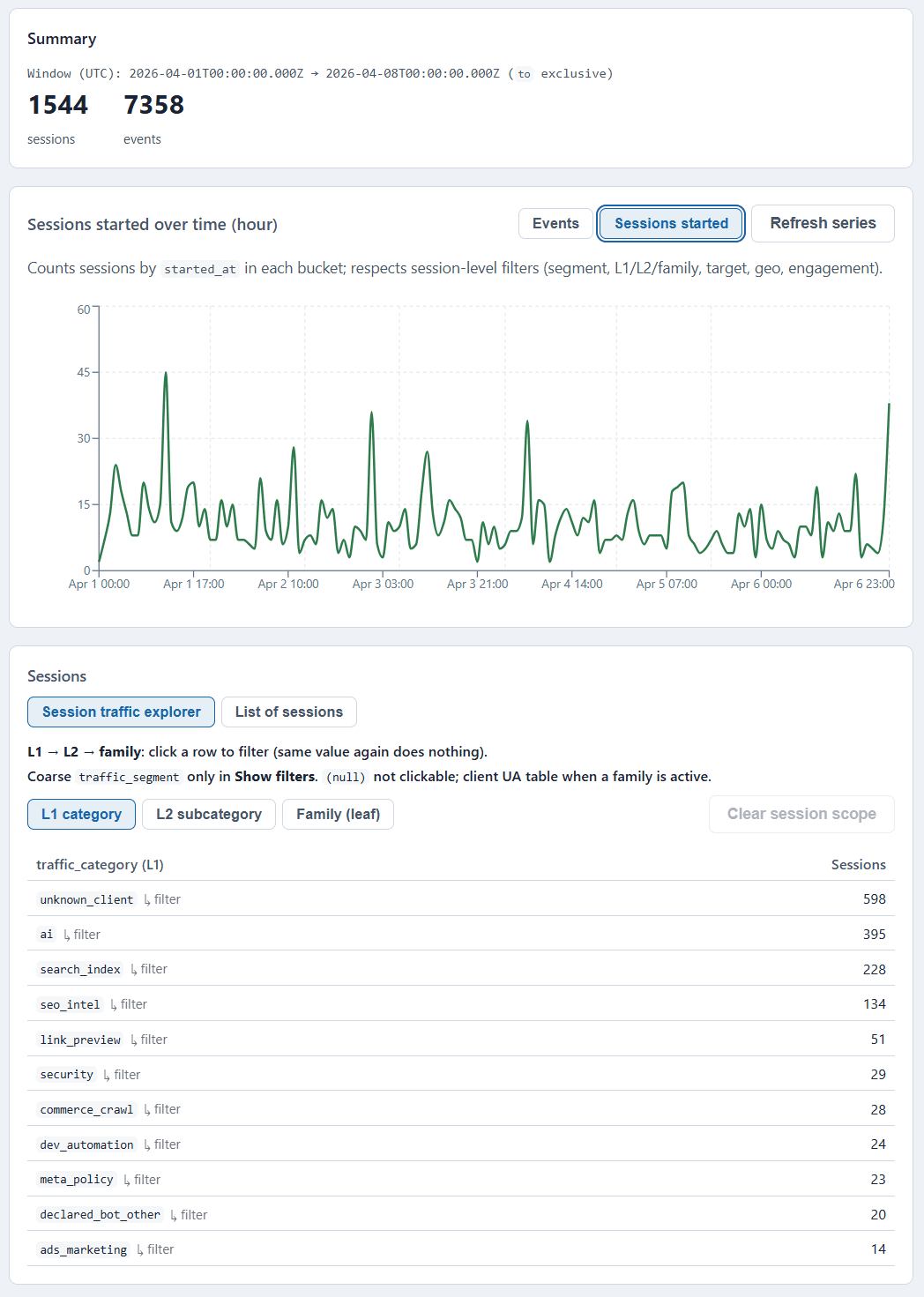
Logwick UI: L1 composition and AI user-fetch flow (screenshot from the open-source repo, v1.1.0).
AI agents crawling your content
GPTBot, ClaudeBot, Perplexity, Common Crawl, Google Vertex, Amazon Nova, DuckAssistBot read your site for training, AI search, and citations. Your GA shows: 0 sessions. Because they do not run JavaScript.
Someone sharing your link in Slack
Every time your URL is posted in Slack, Telegram, WhatsApp, LinkedIn, Discord, or X, bots fetch the page to build a preview. Your GA shows: nothing. Server logs show who, when, and how often.
Ahrefs, Semrush, Screaming Frog on your site
SEO intel bots map your graph and audit structure continuously. Your GA shows: silence. Your logs show every crawl, timestamped.
Raw HTTP logs are the only place to catch all of this. Logwick does exactly that.
Everything Logwick can see, classified, not guessed
A multi-phase engine (UA patterns, path heuristics, transfer-size signals) maps every request to a stable taxonomy: L1 category, L2 subcategory, traffic family. Open a category to see what it detects and why it matters.
AI traffic
The AI-visibility signal: training crawl vs user-fetch vs search index, by vendor.
L1 / ai
AI traffic
The AI-visibility signal: training crawl vs user-fetch vs search index, by vendor.
User-initiated fetches, AI search indexers, training crawlers, shopping assistants, answer engines, and cloud agents, classified from User-Agent and behaviour signals.
User-initiated AI fetches
GPT user browse, Perplexity user fetch, NotebookLM, Anthropic user flows
Someone asked an AI about you; it fetched your page to cite or summarize it. The strongest AI-visibility signal in raw logs.
AI search indexers
OpenAI SearchBot, PerplexityBot, AzureAI-SearchBot, Anthropic search
AI-native search engines building an index from your content.
AI training corpus crawlers
Common Crawl, Bytespider (ByteDance), AI2, OpenAI corpus patterns
Your pages may enter model training or dataset pipelines.
AI shopping assistants
Amazon Nova, Buy for Me, AMZN-SearchBot, AmazonBot-Video
Commerce AI checking product detail pages and media.
AI answer crawlers
DuckAssistBot
Answer engines pulling page text for responses.
Cloud AI agents
Google Vertex Agent and similar enterprise fetchers
Automated pipelines reading your site inside customer workflows.
SEO and rank intelligence
Backlink mappers, rank auditors, and the brokers reselling their crawl data.
L1 / seo_intel
SEO and rank intelligence
Backlink mappers, rank auditors, and the brokers reselling their crawl data.
Link graph mappers
Ahrefs, Majestic, Barkrowler
Backlink databases: your site is part of competitive intel.
Rank auditors
Semrush, Screaming Frog, Sitebulb, OnCrawl, Lumar
Crawl depth and frequency reveal audits and competitor interest.
SERP data APIs
DataForSEO and similar brokers
Third parties reselling crawl-derived signals.
LLM visibility checkers
LLM-Discoverability-Checker, Amplitude AI Visibility Bot
Bots measuring how you appear to AI systems, not classic SEO alone.
Link previews and social sharing
Unfurl traffic classic analytics never attributes: feeds, messengers, embeds.
L1 / link_preview
Link previews and social sharing
Unfurl traffic classic analytics never attributes: feeds, messengers, embeds.
Most classic analytics never attribute unfurl traffic. Logwick separates social feeds, messengers, embed crawlers, and generic preview tools.
Social platform unfurlers
Facebook, LinkedIn, X/Twitter, Pinterest, Reddit, TikTok
Your URL was shared in a public feed: a real distribution signal.
Messenger previews
Slack, Telegram, WhatsApp, Discord, Skype
Private and channel shares generate repeatable preview fetches.
Embed and oEmbed crawlers
Embedly, iframely
Your content is being embedded elsewhere.
Generic link unfurlers
tool_linkpreview, URL preview services
Third-party apps validating links outside major platforms.
For content teams
A spike in Telegram preview bots on one article often means it spread in a private channel, something JavaScript analytics will not show.
Classic search engines
Global majors, regional engines, and the alt search crawlers.
L1 / search_index
Classic search engines
Global majors, regional engines, and the alt search crawlers.
Global majors
Googlebot, Bingbot
Regional search
Yandex, Baidu, Naver, Petal (Huawei), Coccoc
Alt search
DuckDuckGo, Mojeek, Qwant, Seznam, Exabot
Security and attack traffic
Active probes, secret scanners, and internet-wide measurement services.
L1 / security
Security and attack traffic
Active probes, secret scanners, and internet-wide measurement services.
Active probes and attacks
sqlmap, Nikto, Masscan, Burp Suite signatures
Detect when someone is actively probing your stack.
Env and secrets scanners
/.env, wp-admin, CMS exploit paths
Credential harvesting and CMS probes visible in paths.
Measurement services
Censys, Shodan, Qualys
Internet-wide scanning, different from targeted hostile probes.
Phase A
Even if an attacker spoofs a GPTBot User-Agent, path-first rules can still classify /.env-style probes as security/attack, not AI.
Infrastructure and monitoring
Uptime monitors and CDN health checks, split out so they do not inflate bot counts.
L1 / infra_monitor
Infrastructure and monitoring
Uptime monitors and CDN health checks, split out so they do not inflate bot counts.
Uptime monitors, CDN health checks (Cloudflare, Route53, Stackdriver), and Atlassian Statuspage probes, split out from human and marketing bot traffic so they do not inflate bot counts.
Dev automation
Developer tooling and audits, kept separate from real users.
L1 / dev_automation
Dev automation
Developer tooling and audits, kept separate from real users.
curl, wget, Python requests, Go net/http, Node scripts, load generators, Lighthouse and PageSpeed audits, and CMS cron jobs, classified so you can tell developer tooling from real users.
Feed readers
Who pulls your feeds, and how often.
L1 / feed_sync
Feed readers
Who pulls your feeds, and how often.
RSS aggregators and feed readers: who pulls your feeds and how often.
Archive bots
Wayback Machine and Heritrix-style crawlers.
L1 / archive
Archive bots
Wayback Machine and Heritrix-style crawlers.
Internet Archive / Wayback Machine and Heritrix-style crawlers.
Commerce crawlers
General catalog crawl, distinct from AI shopping assistants.
L1 / commerce_crawl
Commerce crawlers
General catalog crawl, distinct from AI shopping assistants.
General Amazonbot catalog crawl, distinct from the Amazon AI shopping assistants above.
Ads and marketing bots
Ad-network crawlers and prefetchers, separated from organic users.
L1 / ads_marketing
Ads and marketing bots
Ad-network crawlers and prefetchers, separated from organic users.
Google Ads (AdSense, Mediapartners, StoreBot), Microsoft AdIdxBot, Meta Ads crawlers, Google Read-Aloud, and privacy-preserving prefetch, all separated from organic users.
Unknown clients
Real browsers and unrecognized automation that matched no bot rule.
L1 / unknown_client
Unknown clients
Real browsers and unrecognized automation that matched no bot rule.
Traffic that did not match a bot rule: real browsers, unrecognized apps, or automation without a known pattern. Human traffic stays identifiable versus labeled bots.
Phase D, transfer-size gate
Browser-like User-Agents with abnormally small bodies for a URL can be flagged as suspect light fetches. Baselines and guards reduce false positives on lightweight or cached responses.
Drop your logs in. Get the full picture in seconds.
One ordered pipeline, from the JSONL your edge already writes to a local dashboard. Path rules run first, so a spoofed User-Agent never beats an attack signature.
Input
Ingest the JSONL you already have
Your edge or CDN (Nginx, Caddy, Cloudflare, Fastly, any JSONL writer) already records every request. Point the CLI at the file on disk.
Phase A
Path and method attack rules
Path-first rules catch /.env-style probes and exploit paths before any User-Agent is trusted.
Phase B
User-Agent rules
AI, archive, crawler, then other bot, matched against an explicit, human-readable registry.
Phase C
Meta-path policy
/robots.txt and sitemap.xml hits are classified by intent, not lumped in with page views.
Phase D
Transfer-size gate
A browser User-Agent with an abnormally tiny body for the URL is flagged as a suspect light fetch.
Output
Sessionize, store, explore
Requests roll up into sessions, land in SQLite, and serve a read-only dashboard API at 127.0.0.1:8787.
Three commands to start
npm install

npm run process -- --config config/process.example.json \
  --target-id demo \
  --db data/analytics/http-analytics.db \
  --input path/to/access.jsonl

npm run dashboard-api -- --db data/analytics/http-analytics.db --port 8787
Then open http://127.0.0.1:8787/ for the dashboard UI. Full setup: docs/getting-started.md.
Who needs this, and what questions it answers
Five teams, one local SQLite file, the questions GA cannot answer.
- SEO and content teams
Is GPTBot indexing new articles? Which AI search engines cite you? Is Ahrefs daily or weekly? Did a post explode in Telegram channels?
- Infra and SRE
Is someone scanning .env and wp-admin? Which monitors hit you? Is the 3 AM spike bots or users, without shipping logs to a vendor?
- Marketing and growth
Which platforms unfurl your links? Are URLs shared inside Slack workspaces? Preview spikes are virality leads GA never shows.
- Indie hackers and small sites
Full traffic picture without GA, Plausible, or a client snippet. One SQLite file on a laptop, no account or billing.
- SaaS and API products
Is pricing scraped every ten minutes? Is a competitor running Screaming Frog on your docs? HTTP facts, not pageview guesses.
How we think about this
What you see is what runs: local processing, readable rules, and honest limits.
Your logs never leave your machine
Processing is local. SQLite on disk. Dashboard on 127.0.0.1. Logwick has no telemetry, no update pings, and no cloud sync. You define retention, access, and deletion.
Rules you can read and extend
Classification is not a black box. The YAML registry is human-readable. Phases, thresholds, and path policies are documented and configurable, with codegen to compile rules.
First match wins, with explicit precedence
Phase A beats Phase B. A GPTBot User-Agent hitting /.env is classified as a security attack, not an AI crawler. The taxonomy is explicit, not probabilistic.
We document the limits
Some bots spoof browsers. Lightweight sites can skew Phase D baselines. The docs state blind spots so you know what to trust.
No client-side compromise
A tracking tag costs performance, creates GDPR surface area, and ties you to ad networks. If your edge writes JSONL, Logwick needs none of it.
Built to stay small, auditable, and dependency-light
No database server. No message queue. No cloud calls. The pipeline runs on a laptop or a small VPS.
Runtime
Node.js 20+, npm workspaces (apps/*, packages/*), ES modules
Pipeline
JSONL to CLI process to SQLite (better-sqlite3)
Classification
YAML registry to generated rules, JSON Schema / Ajv validation
Dashboard
Static HTML/CSS/JS + ECharts, read-only JSON API (Node http, 127.0.0.1:8787)
Testing and quality
node --test, ESLint 9, codegen parity checks
Copy the SQLite file, back it up, or query it with any tool you already use.
How Logwick compares
Server-side analytics that reads your own edge logs, so it catches the automated traffic client-side tools never see. It complements Cloudflare AI Crawl Control and your JS analytics; it does not replace them.
| Tool | Data source | Catches AI & bots that skip JS | Self-hosted / local | Open source |
|---|---|---|---|---|
| Logwick | Server / edge JSONL logs | UA + path + behavior taxonomy | SQLite + localhost | AGPL-3.0 |
| Cloudflare AI Crawl Control | Cloudflare edge | AI crawlers | SaaS, Cloudflare-only | |
| Dark Visitors | Tracking + agent list | AI agents | SaaS | |
| GoAccess | Server logs | generic bots, no AI taxonomy | ||
| GA4 / Plausible / Umami / Matomo | Client-side JS tag | bots and AI do not run JS | varies | varies |
Free and open. Commercial when you need it.
Logwick is open-source under AGPL-3.0: self-host it, read every rule, extend the taxonomy. A commercial license removes the AGPL obligations and adds support.
Open source · AGPL-3.0
Run it yourself, free
Clone the repo, point the CLI at your JSONL, and own the whole pipeline. Ideal for personal sites, internal tools, and other open-source projects.
New here? Read the launch story.
Commercial license
For companies and closed products
- Commercial license
Use without AGPL obligations inside your company or product.
- Extended detection signatures
Broader bot and AI pattern library on a release cadence.
- Integration and consulting
Pipeline design, JSONL adapters, rule authoring, training.
- Custom support
Priority responses, bug fixes, and feature requests.
Frequently asked questions
AI bots, privacy, GDPR, and how Logwick fits next to the analytics you already run.
Is Logwick an open-source alternative to Cloudflare AI Crawl Control?
Yes. Logwick gives you AI bot monitoring and crawler analytics from any edge or CDN that can emit JSONL, not only Cloudflare. It runs locally, stores data in a single SQLite file, and is licensed under AGPL-3.0 (with a commercial license available).
How do I track GPTBot, ChatGPT, or Perplexity on my site?
Point the CLI at your edge JSONL, run the process command, and open the local dashboard. GPTBot, ChatGPT-User, PerplexityBot, ClaudeBot, and other vendors are classified by family, with per-path breakdowns and an AI user-fetch flow that shows which pages were fetched in response to a user prompt.
Does Logwick measure AI visibility like a rank tracker?
Not LLM answer rankings. Logwick shows which AI agents and crawlers fetch your URLs from server logs: the upstream traffic signal, split into training crawl, user-fetch, and AI search index. It is the raw evidence that an AI read your page, not a position score.
How is Logwick different from GoAccess or other log analyzers?
Logwick adds a multi-phase traffic taxonomy (humans, search crawlers, AI training and user-fetch, link previews, SEO tools, security probes) and rolls requests into sessions, instead of only counting hits. Path rules run before User-Agent rules, so a spoofed agent on an exploit path is classified as an attack.
Does Logwick work with Cloudflare, Nginx, or Caddy?
Yes. Anything that produces JSONL access logs works. Logwick does not ship logs for you; you point the CLI at a file on disk.
Does Logwick replace Google Analytics?
No, and it is not trying to. GA is for human behaviour, funnels, and conversions. Logwick answers who made each HTTP request, including the traffic that never runs JavaScript. Many teams use both.
Does any data leave my machine?
No. Processing is local, storage is a single SQLite file, the dashboard binds to 127.0.0.1, and Logwick has no telemetry or cloud sync.
Is Logwick GDPR-compliant?
HTTP logs can contain personal data such as IP addresses and User-Agents. Logwick processes them locally; nothing is sent to our servers. Retention, access control, and legal basis are your responsibility; consult your DPO for your setup.
Can I detect when my content is scraped for AI training?
Yes. The taxonomy includes families such as OpenAI training corpus, Anthropic training corpus, ByteDance Bytespider, and Common Crawl under the AI vendor training-corpus branch when those User-Agents and patterns match.
How do I know if my link went viral on Telegram?
A spike in link_preview / messaging / telegram sessions on a specific URL versus your baseline is a strong signal. Compare time series and session lists in the local dashboard.
Can I extend the classification rules?
Yes. Edit the traffic family registry in the repository, run the documented codegen step for traffic rules, and the engine picks up the compiled patterns. See the project docs for the exact commands and file paths.
Commercial license · integration · support
See what your logs have been hiding
Or email hi@r-sun.ai